


 Microsoft Office 2016 comes in many different languages. You can download the Office 2016 installer setup in the language of your choice. The problem comes when you want to work in more than one language on the same system in which Office 2016 is installed. Or you want to change the primary language of your Office 2016 installation which you do not want to re-install. Microsoft provides a way to install multiple languages within a single Office 2016 installation and choose the primary language of your choice.
Language Interface Pack:
Language Interface Packs for Office 2016 are only available to Volume Licensing customers. These let you install Office 2016 in more than one language on a single computer. The system administrators can specify a language for each user for remote installation. The language interface packs can also be deployed to different user groups in an Active Directory environment.
Office 2016 language packs direct download links
We are providing the direct download links of all the available Office 2016 language packs. Not all the language packs may include all the features that are discussed above. Some languages may have restrictions like they may not include a spell checker etc. But most of the language packs come with full feature set. We are only providing the language packs with full support.
Step 1: Install the language accessory pack
The language accessory pack files that are available for download can be installed on either 32-bit or 64-bit versions of Office 2016.
Language Accessory Pack for Office 2016
Language packs add additional display, help, or proofing tools. You can install language accessory packs after installing Microsoft Office 2016. Just follow the two steps below. (If you are on Office 2013, please install your language packs from here.) If a language accessory pack is described as having partial localization, some parts of Office may still display in the language of your copy of Microsoft Office.
NOTES:
- If your organization installed Office 2016 on your computer, contact your IT department to install any language packs.
- If you are using a Volume License version of Microsoft Office 2016, you can download an ISO image of the language packs, language interface packs, and proofing tools from the Volume Licensing Service Center (VLSC). Please contact your administrator for more information.
Step 1: Install the language accessory pack
The language accessory pack files that are available for download can be installed on either 32-bit or 64-bit versions of Office 2016.
Step 2: Configure Office language
After you install the language accessory pack, you must configure Office for your new language preferences.
- Open any Office program and then click File > Options > Language.
- Under Choose Editing Languages, make sure that the language you want to use is added to this list.
- If the language accessory pack includes proofing tools for that language, the Proofing column shows Installed.
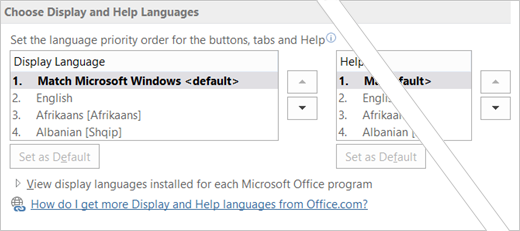
- Under Choose Display and Help languages, you can change the default display and help languages for all your Office applications.
- If the language accessory pack contained display and help for the language, you should see it listed here.
- Restart all Office programs for your changes to take effect.You can change the default language for all your Office applications in the Set the Office Language Preferences dialog. For more information, see Add a language or set language preferences in Office.
LINK : DOWNLOAD


 – Hotspot Shield VPN Elite Edition 5.3.2 Full Version merupakan sebuah software yang menawarkan perlindungan privasi online. Dengan menggunakan Hotspot Shield Vpn Elite Edition ini, sobat bisa membuka situs-situs yang diblokir. Tidak hanya berguna sebagai software by pass situs yang diblokir, Hotspot Shield VPN Elite Edition nyatanya juga membantu melakukan perlindungan komputer kamu dari ancaman berbahaya didunia internet yang bisa saja setiap saat menyerang seperti malware, phising, spam site yang dapat merusak sistem komputer sobat. Penasaran dengan kehebatan Hotspot Shield Vpn Elite Edition ini? Berikut ini cuplikannya.


